
1. Select Problem Type
Start by typing a keyword that best describes your issue – for example, 'pothole' or 'noise complaint' – or choose a problem type from the list.
2. Enter Problem Details
Next, tell us more about the problem. The more detail, the better. If you have a photo, you can upload it here to help us better understand the issue.
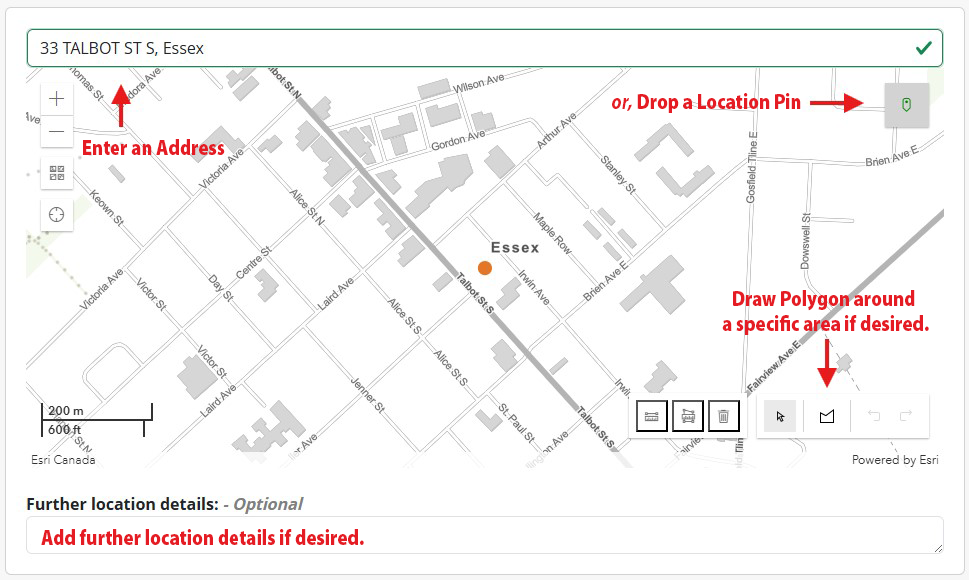
3. Add a Location
Begin typing the address to select a known location, or use the red location icon at the top right to place a pin on the map.
Want to be more precise? Use the 'Draw a polygon' tool to highlight a specific area. You can also add any extra location details that might help our team find the issue faster.
4. Contact Information
- Enter your name and email address. Your phone number is optional. Let us know if you'd like a follow-up call about your request.
- Click 'Submit'. A unique Service Request Number will be assigned, and you’ll receive a confirmation email with that number for reference.
How to Check the Status of your Request
To check the status of your request at any time, simply return to the system and click the ‘Check Service Request Status’ button in the top righthand corner. Enter your Service Request Number and Last Name to view the status of your request.
